When a battery security camera needs charging far sooner than expected, the usual cause is how often it wakes and how hard it works each time. Every clip and every live view draws on the same small battery. A weak signal can raise the power needed to send footage, and cold weather reduces how much of the stored charge is usable.
Most of the fixes cost nothing. The first step is finding out what wakes the WiFi camera. Cutting false triggers, long viewing sessions and unnecessary night lighting then leaves a solar panel less to replace.
Finding out what wakes the camera
For a battery security camera, battery consumption depends on its recording mode, detection settings and how often it is used. On models that rely on motion-triggered recording, frequent triggers can mean more recording activity and higher power consumption. AOV (Always-On Video) works differently: supported cameras can record at a lower frame rate during quiet periods and switch to a higher frame rate when activity is detected.
The event list in the app is a useful starting point for identifying unnecessary alerts and recordings, although it may not reveal every source of battery drain.
A typical day’s list is worth reviewing before changing any settings. Clips that show nothing of interest, or that arrive at the same hour every day, may indicate that detection settings need adjusting to reduce unnecessary activity without missing important events.
Common patterns and likely causes
Each cause below is a likely one, so the event list is worth checking again after each fix.
| What you notice | Likely cause | First thing to try |
| Clips of passing cars or people on the pavement | Detection area reaches past your boundary | Re-aim the camera or lower its sensitivity |
| Empty clips on sunny afternoons or near a vent | Possible false trigger from changing heat, or a visitor gone before recording began | Point the camera away from sunlit surfaces and air outlets |
| Few clips, but the charge still falls quickly | Weak signal, long live views or night lighting | Check connection stability and how often you view |
| Faster drain in winter, even with a panel | Cold, short days and low sun | Re-angle the panel and charge indoors |
Cutting unnecessary wake-ups
A battery-powered wifi camera can use different recording and detection methods depending on the model. On cameras that use PIR-based motion detection, the sensor responds to changes in infrared radiation within its field of view. Camera placement and sensitivity settings can affect how often motion is detected and, on models that wake or start recording in response to these triggers, how much battery power is used.
Keeping heat and traffic out of view
Direct sunlight or car headlights striking the sensor can cause false triggers. So can warm air from an outdoor air-conditioning unit or boiler flue if it blows across the lens or quickly heats surfaces in view. Angling the camera down towards your own path or drive keeps the road, and much of this interference, out of its view.
Sensitivity and detection range
Lowering PIR sensitivity cuts the number of triggers, including some you may want, so it is worth checking the event list afterwards to make sure visitors are still recorded. Where a model has a separate detection-range setting, shortening it helps too; on models without one, the camera’s angle is the main way to limit how far it sees.
How much person detection saves
Person detection does not necessarily prevent the initial wake-up, because the camera has to wake to work out what moved. Any battery saving depends on what the model does with events that turn out not to involve a person, such as whether it still records or uploads them.
Reducing unnecessary battery use
Connection stability
An unstable connection can make a WiFi camera use more power while it sends footage. The app’s signal reading gives a rough guide, and a live view that loads reliably at the mounting point confirms the connection is stable.
The ieGeek ZY-C1, ieGeek S5 and ieGeek S7 connect on 2.4GHz only, so an extender or mesh node near them has to broadcast that band. Moving the router, adding a node or mounting the camera a little closer to the house will usually steady a weak connection.
Clip length
Each extra second of recording keeps the camera awake for longer. The shortest setting that still covers a whole visit, from approach to departure, uses the least power without cutting events short.
Viewing habits and night lighting
Long or frequent live views keep the camera awake, and so does playing back footage stored on its microSD card, which has to stream from the camera itself. Clips already uploaded to the cloud do not normally need the camera to send them again.
After dark, infrared LEDs and a colour night-vision spotlight both draw battery power. Where a porch light already lights the scene, switching infrared off may still leave usable footage.
Solar charging and cold weather
A solar panel helps a battery security camera most once wasted wake-ups are gone. Solar charging is slow, so a busy camera may still need an occasional charge from a mains adapter.
Where to put the panel
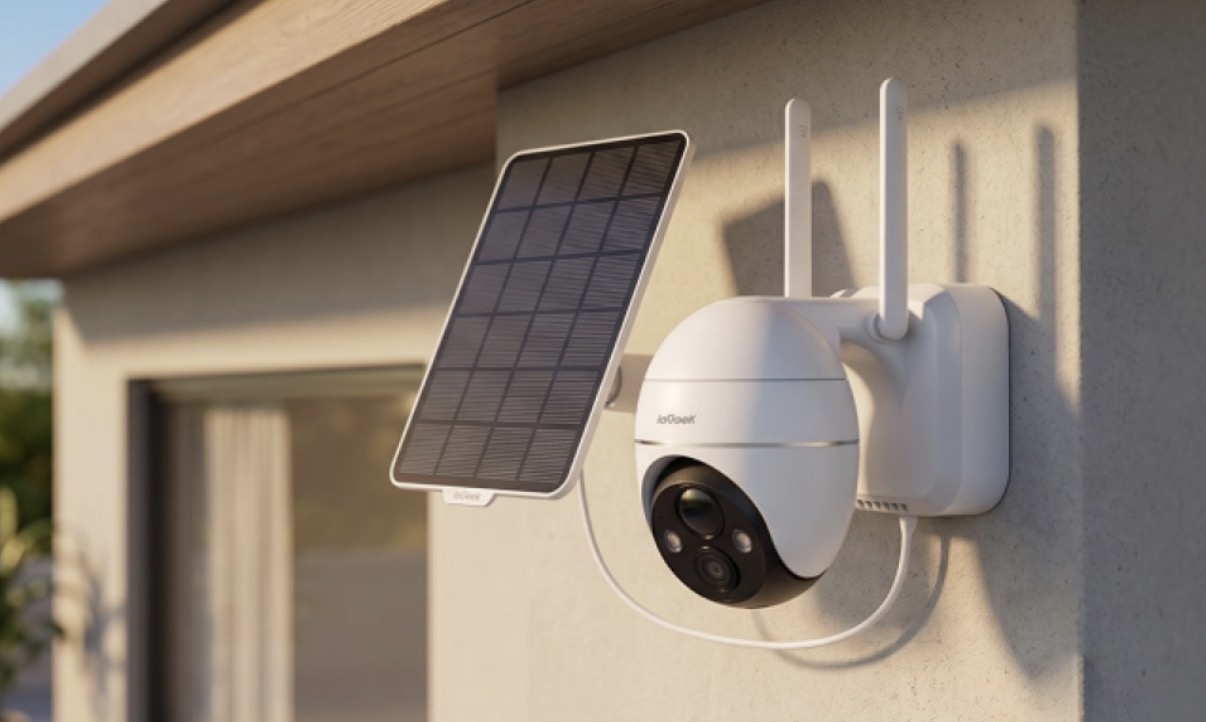
A panel needs open sky, ideally facing south and clear of trees and eaves, while a PIR sensor works best out of direct sunlight. The ieGeek S5 handles both: its panel detaches on a 3-metre cable, so the panel can sit in the sun while the camera watches from shade. The ieGeek ZY-C1 can take an optional panel, and any panel charges better when kept free of leaves and grime.
Angling the panel for winter sun
On the shortest day, the midday sun in London is only about 15° above the horizon, and lower further north. In direct winter sunlight, a steep, almost upright panel catches more of that low light than one angled towards the sky, so it is worth steepening the angle in autumn if the bracket allows.
Checking whether the panel keeps up
A small panel’s output can fall too low to charge at all in shade, on dull days and early or late in the day. With an ieGeek panel connected, a charging icon in the live view shows when it is charging.
If the battery level keeps falling over several days, solar charging may not be keeping up with use. A level that rises slowly but has not yet reached 100% is not, on its own, a sign of a problem. Where the area can safely go unmonitored, a short test with motion detection switched off can show how much event activity contributes, as long as detection goes back on afterwards.
Charging in cold weather
Cold raises a lithium-ion battery’s internal resistance and temporarily reduces its usable capacity, which recovers once the battery warms up. In freezing weather, the camera is best brought indoors to warm up before charging, within the temperature range specified for that model. The ieGeek ZY-C1’s battery is built in, so the whole camera has to come inside.
If your camera uses Always-On Video
AOV (Always-On Video) cameras such as the ieGeek S7 can record low-frame-rate footage between events, then switch to a higher frame rate when activity is detected. Battery use therefore depends on the background recording settings as well as on how many events there are.
In the darkest weeks, a lower background frame rate or a switch to motion-triggered recording, where the app offers these options, can help a WiFi camera supported by a solar panel last until the days lengthen.
Checking that the changes work
Changing one thing at a time, and noting the battery level at a similar hour each day alongside event counts, viewing time and weather, shows which change helped. A walk past the camera by day and after dark confirms it still records visitors in the detail you need.
If the drain stays fast despite few events, a stable connection and normal charging, the charger, cable, port or the battery security camera itself may be faulty, and support is the next step.